Skip to content
  • support@smarthostee.com
  • Hosting Flash Sale: Starting at
  • $14.99 / Mo
  • Need Help?
  • Login
  • Reseller Hosting
  • WordPress Hosting
  • Shared Hosting
  • Email Hosting
  • Domain Name
  • Help Center
    • FAQs
    • Contact Us
    • Knowledge Base
  • Reseller Hosting
  • WordPress Hosting
  • Shared Hosting
  • Email Hosting
  • Domain Name
  • Help Center
    • FAQs
    • Contact Us
    • Knowledge Base
Client Area
  • Home
  • Store
    • Browse All
    • Reseller Hosting
    • WordPress Hosting
    • Shared Hosting
    • Email Hosting
    • 360 Monitoring
    • Site & Server Monitoring
    • Register a New Domain
    • Transfer Domains to Us
  • Announcements
  • Knowledgebase
  • Network Status
  • Affiliates
  • Contact Us
  • More
  • Account
    • Login
    • Register
    • Forgot Password?
  • 0 Shopping Cart
  1. Portal Home
  2. Knowledgebase
  3. Plesk
  4. CloudLinux(Plesk)
  5. How to Change the PHP Version via CloudLinux Selector in Plesk

  Categories

CloudLinux (cPanel)
10
CloudLinux (WHM)
2
cpanel
24
Databases
11
DirectAdmin
47
DNS Nameservers
6
Domains
12
Email Hosting
15
FTP
9
Hosting Panel & Plan Comparisons
1
Installing a Control Panel
6
JetBackup
2
Mail Filters & SPAM
8
Migration
1
Mobile
11
Others
3
PayPal
7
Plesk
47
Policies & Compliance
1
Reseller Hosting
4
Security
10
SiteWorx/InterWorx
57
Softaculous
67
SolusVM
22
SSL Certificates
6
Virtualizor
19
WHM
20
WordPress
17

  Categories

  Support

My Support Tickets
Announcements
Knowledgebase
Downloads
Network Status
Open Ticket

How to Change the PHP Version via CloudLinux Selector in Plesk Print

  • 0

You can use CloudLinux's Select PHP Version to change your website's PHP Version. CloudLinux provides various PHP Versions to choose from.


1. Log in to your Plesk account.


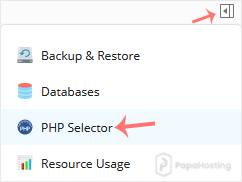
2. Click on the Pull icon in the right sidebar and choose PHP Selector.
plesk-cl-php-selector-menu.gif


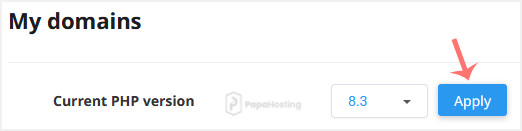
3. To the right side of the Current PHP version, click on the drop-down menu and choose the version you want to use.

plesk-da-cl-change-php-version.gif


4. Click Apply.

cl-set-as-php-version.gif


Was this answer helpful?

Related Articles

How to Enable ionCube Loader Using CloudLinux Selector in Plesk You can use CloudLinux Selector to enable ionCube Loader in Plesk.   1. Log in to your Plesk... How to Enable the GD Extension of PHP Using CloudLinux Selector in Plesk You can use CloudLinux Selector to enable GD extension in PHP via Plesk.   1. Log in to your... How to Enable the Mailparse Extension of PHP Using CloudLinux Selector in Plesk You can use CloudLinux Selector to enable the Mailparse extension in PHP via Plesk.   1. Log in... How to Enable or Disable PHP Extensions Using the CloudLinux Selector in Plesk You can use CloudLinux Selector to enable or disable available PHP extensions in Plesk.   1.... How to Enable or Disable PHP's allow_url_fopen Using CloudLinux Selector in Plesk You can use CloudLinux Selector to enable or disable the allow_url_fopen directive in Plesk....
« Back

  Support

My Support Tickets
Announcements
Knowledgebase
Downloads
Network Status
Open Ticket

Loading...
Loading...
Choose language
العربية
Azerbaijani
Català
中文
Hrvatski
Čeština
Dansk
Nederlands
English
Estonian
Persian
Français
Deutsch
עברית
Magyar
Italiano
Macedonian
Norwegian
Português
Português
Română
Русский
Español
Svenska
Türkçe
Українська

Generate Password

Please enter a number between 8 and 64 for the password length
Blue logo (1)

1111B S Governors Ave, STE 48014

Dover, DE 19904

United States

+1 (669) 444 4008

info@smarthostee.com

Quick Links

  • Blog
  • Sign In
  • Sign Up
  • Blog
  • Sign In
  • Sign Up

Help

  • FAQs
  • Contact
  • FAQs
  • Contact

Services

  • Reseller Hosting
  • Shared Hosting
  • WordPress Hosting
  • Domain Name
  • Email Hosting
  • Reseller Hosting
  • Shared Hosting
  • WordPress Hosting
  • Domain Name
  • Email Hosting

Company

  • Privacy Policy
  • Terms of Service
  • Acceptable Use Policy (AUP)
  • Cancellation & Refund Policy
  • Announcements
  • Privacy Policy
  • Terms of Service
  • Acceptable Use Policy (AUP)
  • Cancellation & Refund Policy
  • Announcements

Social Media

Facebook Instagram Linkedin

© 2025 Smart Hostee Labs Inc. All rights reserved.

Founded in U.S • 99.9% Uptime Guarantee